Thursday, 26 December 2024

jamola AutoGain, WebRTC, router configuring spider

To devise a device to devalue in reverse.

And to hear matey play piano without the background noise filtering algorithm deleting half the sound!

And without crushing the rest of the sound with low bitrate - not spending enough brush strokes of data describing the sound.
Even though it's pretty easy to have loads more bitrate!

And then it's like having your mate made of luxury holographic atoms.

More convincing signal means more action on the brain, etc etc.


...Has led me to take up WebRTC to do phone calls on a webpage! It's easy.

A brief forray into "webrtc insertable-streams API to capture data"

This API can be used for experimenting with end-to-end media encryption (e.g., SFrame. However, this API is not recommended for this use case until a mechanism that allows browsers to perform end-to-end encryption without exposing keys to JavaScript becomes available. This document will also define a mechanism for browsers to provide built-in transformers which do not require JavaScript access to the key or media. Separately, this or some other WG may work on a mechanism for end-to-end keying.

Interesting notes.
Skim this, you can do things:

const mediaSource = new MediaSource();
const videoElement = document.createElement('video');

videoElement.src = URL.createObjectURL(mediaSource);

mediaSource.addEventListener('sourceopen', () => {
const sourceBuffer = mediaSource.addSourceBuffer('video/webm; codecs="vp9"');

// You'd typically fetch or process your stream data here
fetch('video-chunk.webm')
.then(response => response.arrayBuffer())
.then(buffer => {
sourceBuffer.appendBuffer(buffer);

// When done adding all chunks
if (allChunksProcessed) {
mediaSource.endOfStream();
}
});
});

Currently we're working towards this feature: 

### Having gain knobs and meters.

User should start playing loudly and adjust their levels
                                to frame that intensity.

Also I think we could learn something from EasyEffects.
I recommend it.
I particularly use a Limiter
for accidental mega-loud-machine-noise-surges
     from glitching software,
and AutoGain
to standardise the volume of things in general,
which also manages surfing feedback very well.

Laptop power supplies running your stereo
will also switch off if over-amped
during noise surges.

So something about taking care of your ears.

Which is also in the plan|note|calendar time-slot of now thus:

< autogain and limiters is really important
should be toddler proof by default
autogain wanders to keep things at -24dB
but settable as well
for every channel, in case of cyber terror lol
other security initiatives
get a room with a name
people might start using it for what it does

Or exactly as it looks in this codemirror web based editor from before svelte time:


It is highlighting perl keywords.

So we got into wanting a stack of effects I could CRUD with.


And it is back around here again (weeks since the last sentence) that I am:
 * building a Peering layer, between Party and the ws-client, that provides well-managed Participants.
But since rejigging what goes on when you startConnection() we are:
 * not able to receive any par.channel (RTCDataChannel just state=connecting)
No data channel, hence:
  no name, no effects with their saved-by-name configurations.
No tracks arriving either
  however I have built to queue them before going into the as-yet no effects...

I have no idea why nothing can be sent over par.pc - perhaps that object wants an onerror or something?

I refactor some other things to kill time and maybe bump something.

So lets have an aside. Here's the possibly remote person and their effects, which tracks go through:

export class Participant {
// coms
name = $state()
...
// Call
effects = $state()
    ...
// pc, datachannel and name are ready!
// or it is par.local, which is ready immediately
// after this something will par.fresh.input()
// for local it's i_myself_par(), otherwise open_ontrack()
on_ready() {
console.log(`par.on_ready: ${this}`)
this.drop_effects()
this.new_effects()
}
// disarm anything thaaaaaaaaaaaaaaaaaaaaaaaaaaaaaaaaaaaaaaaaaaaaaaaaat makes sound
// the above typo was ubbbbbbbbbbbbbbbbbbbuntu laggin
drop_effects() {
this.effects?.map(fec => fec.destroy())
delete this.effects
}

When we recreate  next time, it's full of the old effects! What the hell.

You gotta:

this.effects = undefined

Or as I commit, effects = undefined or they resurrect!

Anyway, here's a composition made of screenshots taken during one of my computer's seizures:


I simply transform blur things here, all the tile-shuffling and transparent bits are how it was.


Slight crop of the background layer of the above image. Mastodon people are talking, somehow some montane has gotten in there...

Still no WebRTC happiness though.

Watch out for this memory leak, I've found these after a while to be multiple GB:

Refreshing the page, one of them suddenly grows by 30MB, then drops back to 50MB again. This is probably a new instance of whatever is in there throwing itself up and then garbage collection taking out the old instance of whatever.

Even though recording isn't switched on... I'm not sure what else could be saving up the stream..? We'll come back to this before launch, right?

Anyway, we have not remote connectivity, at this point...

And so, gitk is a program we can use to get outside the spaceship of time, to where it worked:
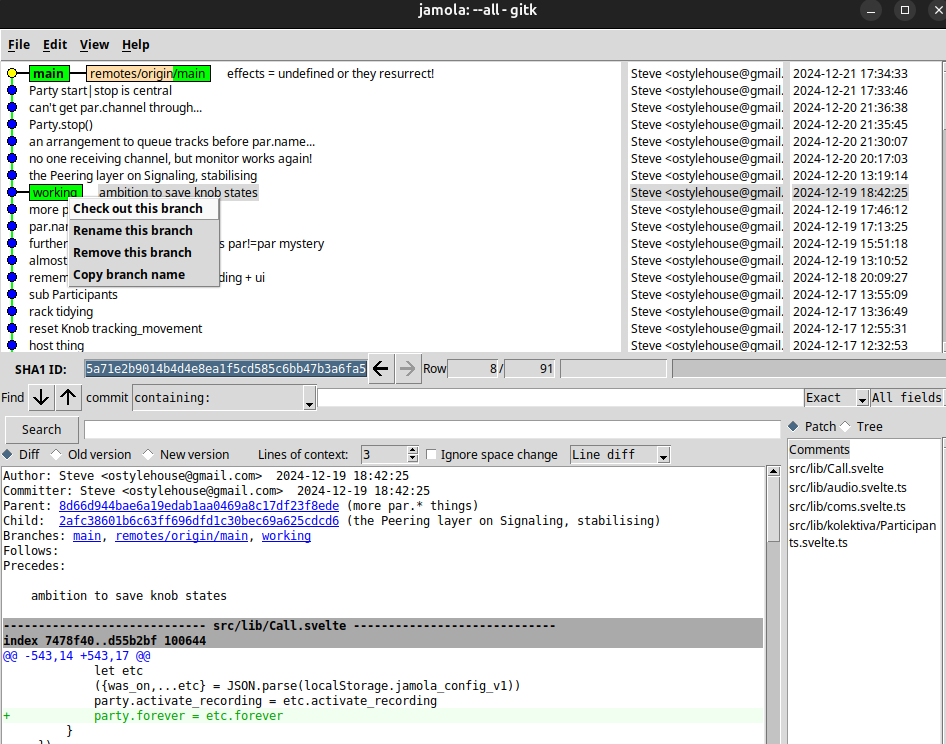

And then bring up larger slabs of data from the good time:


The mid is null and the receiver stream is empty. The setLocalDescription looks very healthy.

The receiver (and mid) of the above object fills out a little later:

receiver:{ track:'106d616b-05b4-494e-9280-2ef06a4126cd', streams:['{a79b4bb4-8eb3-4910-adaa-9d7ebed9a643}'], },

Which means it's going.

And now to check out the main branch again:


Okay, as I had no idea negotiation was a bus you could just miss...

The name "createDataChannel" is quite misleading, it's more like adding an option to something that's happening approximately when you might call it... how racey

why won't it just renogotiate? can't it gettimeofday?

you're not handling onnegotiationneeded anywhere

TADA!


createPeerConnection(peerId) {
const pc = new RTCPeerConnection({
iceServers: [
{ urls: 'stun:stun.l.google.com:19302' }
]
});

// Store it in our map
this.peerConnections.set(peerId, pc);

// Handle ICE candidates
pc.onicecandidate = (event) => {
if (event.candidate) {
this.socket.emit('ice-candidate', {
targetId: peerId, // Send to specific peer
candidate: event.candidate
});
}
};
// Add negotiation handling
pc.onnegotiationneeded = async () => {
try {
if (pc.signalingState === "stable") {
const offer = await pc.createOffer();
await pc.setLocalDescription(offer);
this.socket.emit('offer', {
targetId: peerId,
offer
});
}
} catch (err) {
console.error("Negotiation error for peer", peerId, err);
}
};

// Let them store it in their SvelteMap,
// and attach whatever else (eg .ontrack)
this.on_peer({ peerId, pc });

return pc;
}

Now it should do this when it needs to change the qualities of the phone it's holding...

All the fine grains are stuck in my fingers. Better bike ride-off the tension.

Anyway,

Renegotiation is not that easy!

I put it in a tailspin trying to avoid renegotiation and just recreate par.pc:


Because here is my first try at renegotiation. It seems overly fussy, basically deciding a stable connection is not what it's after:

I'm thinking it should just want one more bit of signalling, something to third-party to the other peer..? Or else why bother the application with handling this event?

I look at Janus Gateway, find a little bit of red herring in the CHANGELOG. janus.c reveals: FIXME This is a renegotiation: we can currently only handle simple changes

PeerJS seems not to need renegotiation! It aims to be simple. I was simple, the only complicated thing I might want is multiple tracks from one client... Since they may provide a backing track or have two mics or whatever.

It's only wanting a datachannel that breaks it. Perhaps... Oh yes:

this.Signaling = new SignalingClient({
on_peer: ({ peerId, pc }) => {
part = 'on_peer'
// a peer connection
// soon to receive tracks, name etc
let par = this.party.i_par({ peerId, pc });
// but first:
this.pc_handlers(par)
// which leads to couldbeready(par) to graduate to tracksable.
// throw datachannel out there now, so it can be part of the first negotiation
                    this.couldbeready(par)
},

        ...
couldbeready(par) {
if (!par.pc_ready) {
// wait for par.pc to get in a good state
return
}
        ...
this.createDataChannel(par)
        ...
}
    ...
stabilise_par_pc(par) {
...
par.pc_ready = ...
this.couldbeready(par)
}

That call to this.couldbeready(par)

Which is our "keep setting up" repeating action,

Will not have par.pc_ready yet! Twas imperceptible in the log.

Oh well, that was it.

So if you want a datachannel you better make one pronto! Is the message.

I'd like to network my people with gear like this. I'm taking the loads of disappointment so they don't have to!

I try to show negotiation going wrong again but it seems to want to work now too. So lets share that!

We can save build time not doing  COPY . . since we already  volumes:

- .:/app:exec

Getting rid of that makes the build take no time! It was throwing uploads/ into every build :-0

Build? Yes. Adding a router configuring spider at 8a32170f78368689c224a6abb8af97243f183c9c using puppeteer.

I take a couple of screenshots to represent "now", which is always in flux:

{
await page.goto('http://192.168.1.1/');

await page.screenshot({ path: '/app/logs/step1.png' });
}
{
await page.type('#index_username', '!!Huawei');
await page.screenshot({ path: '/app/logs/step2.png' });
}

And that tells me that the username is already filled in! This is working.

The rest is code. This is all becoming the self-hosting kit for random NZ flats.

It's unfortunate I had to do all this though. It just keeps forgetting the settings. Why? It's a holiday I am spending working.

But you can do this:

The console.log statements inside page.evaluate() are actually running in the browser's context (the webpage), not in Node.js. To see those logs, you need to:

  1. Either listen to the browser console logs using:
page.on('console', msg => console.log('Browser console:', msg.text()));
  1. Or return the values you want to log from the evaluate function:
// on adding a mapping to a host, we must find the identifier of our application
// will be something like:
// 'InternetGatewayDevice.Services.X_Application.32.'
let portmapapp_name = null
// we will add it if not found here
async function select_portforwarding_app(page) {
let {appid,all} = await page.evaluate(() => {
const select = document.querySelector(
'select#portmapping_app_id_ctrl'
);
const options = Array.from(select.options);
let all = {}
let appid = null
options.map(opt => {
let name = opt.textContent.trim()
all[opt.value] = name
if (name == config.portMapping.name) {
appid = opt.value
}
})
return appid
})
console.log("Found apps:",all)
portmapapp_name = appid
return appid
}

The above is out of date now, config should be passed in. Let's move on though.


Lets intelligise these, which were AI'd from apparently now obsolete Puppeteer code that DevTools Recorder made. It used to have about five different selectors for each thing, pragmatics for organics. Most of them were unintelligible, so we go around replacing the likes of:

await page.click('#i18n-114'); // Save application

With what it didn't notice was a much more human-shaped thing to talk about just above that thing:

// Save application
await page.click('button#portmapping_application_id_add_edit_submitctrl');

And muck about quite thoroughly with validation:


// that takes ages
await casually()
scroll_down()
await page.screenshot({ path: '/app/logs/step5133-form-created.png' });
// fields to fill in appear slowly:
let some = await trySelector(async () => {
await page.waitForSelector('input#portmapping_application_id_add_edit_application_Name_ctrl');
}, "Waiting for the add app form...")
await page.screenshot({ path: '/app/logs/step5134-same.png' });

await page.type('#portmapping_application_id_add_edit_application_Name_ctrl', config.portMapping.name);
// Configure ports
// these start with goddamn zeroes that stay there
let prej = 'div#portmapping_application_id_add_edit div#application_'
let portMappings = [
[prej+'externalPort div input[data-bind="start"]', config.portMapping.externalPort],
[prej+'externalPort div input[data-bind="end"]', config.portMapping.externalPort],
[prej+'internalPort div input[data-bind="start"]', config.portMapping.internalPort],
// [prej+'internalPort div input[data-bind="end"]', config.portMapping.internalPort],
]
// Clear and fill each input
for (const [selector, value] of portMappings) {
await page.evaluate((sel) => {
document.querySelectorAll(sel).forEach(el => {
el.value = '';
// Trigger any validation events
el.dispatchEvent(new Event('input', { bubbles: true }));
el.dispatchEvent(new Event('change', { bubbles: true }));
});
}, selector);
// Click and type with a small delay between each character
await page.click(selector);
await page.keyboard.type(value, { delay: 50 });
}

await page.screenshot({ path: '/app/logs/step5200-ports-filled.png' });
await casually()
await page.screenshot({ path: '/app/logs/step5202-same.png' });
// Save application
await page.click('button#portmapping_application_id_add_edit_submitctrl');
await casually()

But it all worked in the end, now it's just another thing in docker compose.

Here it is running through in screenshots:


Ahhh... Good quality time needs this work done.

A couple of times in the past month I invited people over to my favela on the digital frontier, but their impression turned out to be 100% connection error, because the router forgot what I told it.

With that and that taken care of at around 19de895759883e7c73322976ce536a5228dc3efc lets return to:

Gain

We may be able to trust the user's device to autogain.
Anyone would notice a lack of gain control, but auto gain control is a bit more subtle.
Anyway, violin time.

I think I'll post this now and edit in the main event some time tomorrow...


Wednesday, 11 December 2024

online cannabis marketplace UI DIY

Well. 

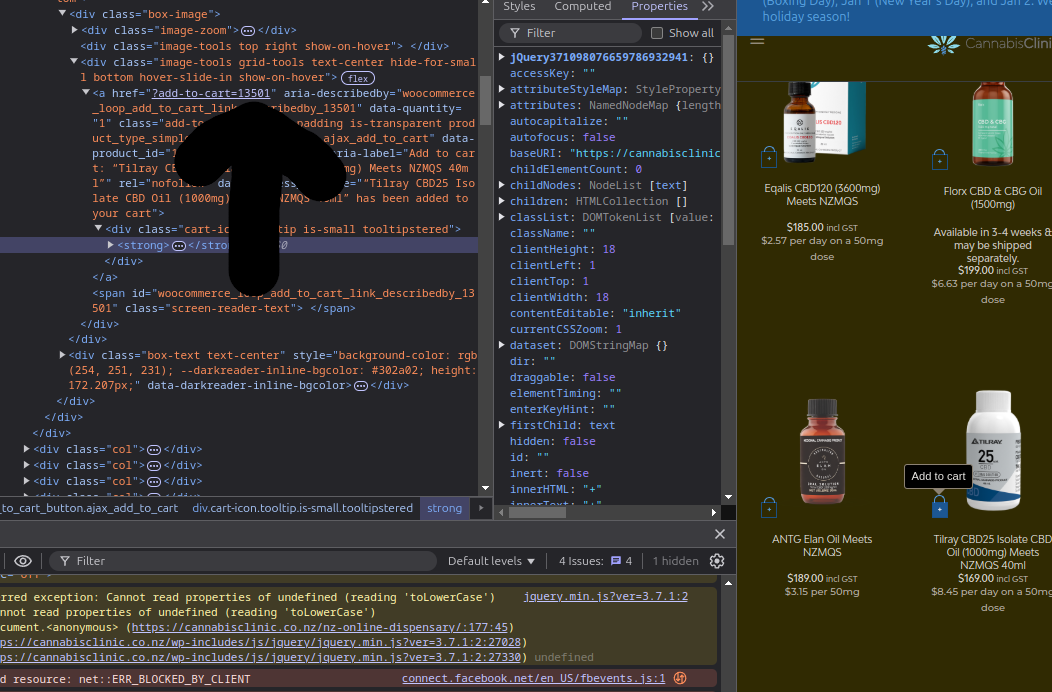
Turns out this number here...

Is all you need to spoof this link:

That link only shows up on some CBD oils, perhaps because their regulations relaxed recently. I think they're now available to anyone that can hold a conversation with a pharmacist, which would automatically include everyone with a cannabis doctor they talk to on here.

I usually buy from another page which has just what I'm supposed to buy on it.

Method

I can go to, say, this product I'm prescribed but not able to buy because it's technically a different product, with a discount applied due to oldness. Obviously that needs separating.

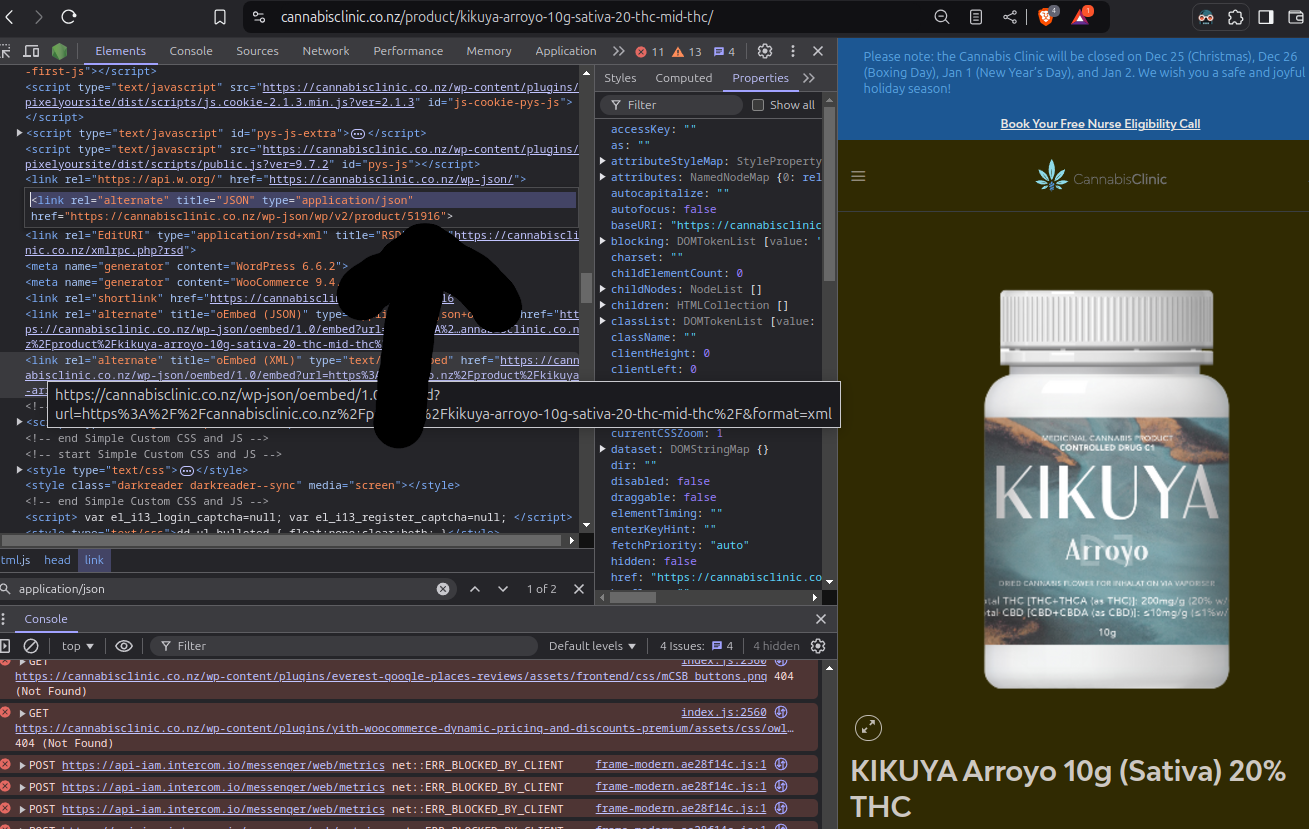
I look for this in the html head:

<link rel="alternate" title="JSON" type="application/json" href="https://cannabisclinic.co.nz/wp-json/wp/v2/product/201233">

I put that into this:

?add-to-cart=201233

And pop that on the end of any url!

UNLESS, your product has a "I declare I have read and understand all the terms and conditions" checkbox...
We'll have to tick that and add a button to the form it's in:

<button type="submit" name="add-to-cart" value="201233" class="single_add_to_cart_button button alt">Nab</button>

It otherwise presents itself as not where to get stuff.

All this surely gets double checked so...

Tuesday, 10 December 2024

vnc

Two generations of my computer face off. And an instance of https://github.com/stylehouse/jamola


Install both ends, in apt: x11vnc xtightvncviewer

$ ssh v x11vnc -storepasswd .local/share/vnc/passwd

If you want a modicum of security, use a password, despite having ssh just there... The two cannot be combined as tightly as you would hope for secure access. Probably because we just use ssh.

server?

port 5900

$ ssh v x11vnc -display :0 -localhost -forever -shared -rfbauth .local/share/vnc/passwd 

Or possibly: 

$ ssh v x11vnc -display :0 -localhost -forever -shared -nopw 

these seem to hang around over there if I Ctrl+C (sigint?) them or disconnect.

client

Via the web

For vnc clients in your pocket, make that available via html and bring its port over:

$ ssh -L 6082:localhost:6082 v novnc_proxy --listen localhost:6082 --vnc localhost:5900

vnc, remotely

web can be a bit slow for testing things, even locally, so bring the vnc port over instead:

$ ssh -L 5900:localhost:5900 v
$ vncviewer localhost

Bold commands are forever run, in their own terminal.

If the vnc screen is all black and uninteractive... I had to unlock the computer in real life, then it reveals.

You get to keep looking at your sensors or etc during a crash, since the last image hangs in the client...

It's a bit laborious to keep doing these things.

If you're suggesting some kind of remote-able supervisor that brings up various systems and does the plumbing... It would need to find running instances of its commands from before network changes, etc, see "seem to hang around".

usually

I just type 'nico' at the terminal, which is bin/nico:
#!/bin/bash
cd ~/src/nicotine-docker
docker compose up -d
vncviewer localhost:59234 &
./upnp-and-run.sh
The upnp part also ensures port forwarding, which at least one peer must have to initiate a connection, and re-ups.

Copy paste

Is clunky in novnc. You paste in a web UI drawer's <textarea> first.

In vncviewer it can seem dodgy.
Middle-click (aka the PRIMARY buffer, the latest text selection buffer) works better than the regular C-C C-V (CLIPBOARD buffer), which involves content type negotiation.

I noticed it depends on the application you copy the text from
eg gnome-terminal and Strawberry (all Qt applications?)
will need that text copied somewhere else (eg your browser's address bar) first, then over VNC.

I suspect it also monitors your buffer for changes to sync, so you have to do the copy after it has seen something else in your buffer.

So it worked for me!

Thanks!

Wednesday, 4 December 2024

virtually install new linux system!

Two identical SSDs. One to wipe, one running this system... Figured out by unplugging it that it is /dev/sda right now.

There is a `cp /dev/sda /media/.../trixie.raw` and back around all this, to get the size of the disk we are going to reformat and OS-ify virtually, with libvirt + qemy.

So I went into virt-manager and made a new machine, not the "Installation" process, but just defining two disks, the installer and the trixie.raw.

Check boot priority.

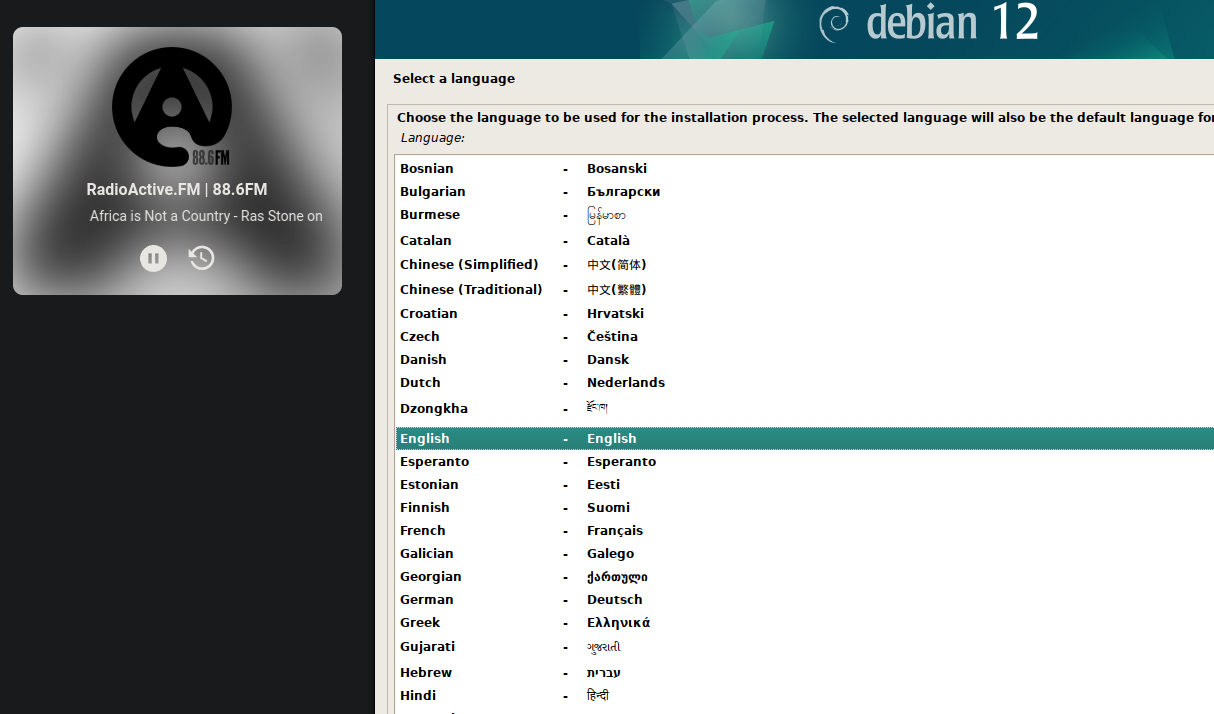
Installing doesn't have to be an emergency on a space station. Here I am, listening to music and choosing my language.

Advice for all the Choosables

Do go here and take the edu variant: https://cdimage.debian.org/cdimage/daily-builds/daily/arch-latest/amd64/iso-cd/
It has a little more firmware included, eg that wireless thing, so it could save time.
It's separate due to legal paranoia, or angelic, ethical purism depending on how you look at it.

Not sure what else it does to your system, choosing edu. Otherwise you'd have to plug in a cable and install 

I am seeking a feature called XFS, so the testing version of debian, the next version, 13. Usually I run stable systems... They seem to have all crapped out.

American English keymap - this means $. I can't remember how to get this laptop keyboard to not say < when I type /.

I enjoy that New Zealand is one of only a dozen "countries or territories" in the world.

Hostname = s
 
Encrypted LVM... No XFS yet. Ubuntu has it here! But alas. My sound is very glitchy and I'm developing a very soundy webapp right now.

Encryption stops stolen hard drives being an open book to anyone who has them. It wouldn't be very ethical to enable that. You could have anyone's data, with all the sharing. One mustn't manufacture consent, haphazardly leak info and enable crime... 

Who knows what social engineering someone's network could be stung with if they lost a computer. Voice recordings are needed to inform a fake voice. Etc.

But do leave the passphrase with someones less likely to die than you. Good.

It will be  


Never hit cancel, or "Go back", to a list of steps in this process, as you will engage a "wants all the questions" mode. Good luck.

Sometimes they will invite you to hit cancel,

Sometimes "there was no installable kernel found in the apt sources. It is likely the system will not be bootable." I just kept going! Surely if it doesn't know where the kernel is, maybe it also doesn't know that it does know where the kernel is...

No gnome, yes xfce4 and some other windowers I might get around to learning.
You get around to it rebooting and you have to Force Off (in virt-manager), and remove the install CD because it still takes priority over the new OS. And Start it again!

It went good, I'm now at a terminal in xfce4!

new Debian + xfce

Note: this may not look like this any more:
Create icons for things you want quick access to:

Debian doesn't give you sudo by default so run this:

Then log out and in because that changed stuff that needs to occur on login...

This is how I get ssh access.

Then apt install openssh-server. Run `ip a` to see what your ip address is, pop it in your current /etc/hosts as 'v', then from the host:

s@s:~/pl$ ssh v
Linux s 6.1.0-28-amd64 #1 SMP PREEMPT_DYNAMIC Debian 6.1.119-1 (2024-11-22) x86_64

The programs included with the Debian GNU/Linux system are free software;
the exact distribution terms for each program are described in the
individual files in /usr/share/doc/*/copyright.

Debian GNU/Linux comes with ABSOLUTELY NO WARRANTY, to the extent
permitted by applicable law.
Last login: Tue Dec  3 13:56:37 2024 from 192.168.122.1
s@s:~$ ll
-bash: ll: command not found
s@s:~$ flatpak remote-add --if-not-exists flathub https://flathub.org/repo/flathub.flatpakrepo
s@s:~$ flatpak install chromium codium
Looking for matches…

And you're away! With constant reauthentication prompts...
It's a via-ssh security policy! You must delete this part of this file:
The issue is with the subject.local == true condition on line 7 in /usr/share/polkit-1/rules.d/org.freedesktop.Flatpak.rules
To edit that you'll need to apt install - and learn the insert-type-escape-:wq-enter basics of:

vim 

And then here's more necessities to apt install:

easyeffects pipewire ffmpeg mplayer

Also, before making a mess that might not work out, you can snapshot the whole system at the lvm level by:
sudo systemctl isolate rescue.target
Vanishing you into a black void!
The filesystem is still mounted, since that is where the system is...
But as long as nothing much is happening...
sudo lvcreate -L 10G -s -n root_snapshot /dev/t-vg/root
And back:
sudo systemctl isolate rescue.target
Or if you are still working virtually and converted the target disk image to qcow2, you could use those snapshots.

The mess that might not work out:
apt install podman-compose
sudo ln -s $(which podman) /usr/local/bin/docker

In fact, just don't do any of the above. But know that it's possible.
This is how you get docker on debian trixie, from a docker.com software source, which is a big deal bug I guess :
echo "deb [arch=$(dpkg --print-architecture) signed-by=/etc/apt/keyrings/docker.gpg] https://download.docker.com/linux/debian bookworm stable" | sudo tee /etc/apt/sources.list.d/docker.list
sudo apt update
sudo apt install docker-ce docker-ce-cli containerd.io docker-compose-plugin
sudo adduser s docker # and relogin
in .bashrc
I do this from the comfort of my main computer via ssh.
A fork holds up the floppy laptop screen, asleep.


Soon it'll be a second monitor and a working mic.
My summer typewriter.
I wander off.
Good luck.