
I am setting up my dev environ on a fresh Ubuntu install, to flee a few problems:
- ice1712 soundcard not accepting streams - programs would hang.
- other problems? I can't remember, but it was being mysteriously sluggish one fateful night
But the VMs worked and now they don't. Let's fix this:
error: Failed to start domain 'gox'
error: internal error: /usr/lib/qemu/qemu-bridge-helper --use-vnet --br=virbr0 --fd=32: failed to communicate with bridge helper: Transport endpoint is not connected
stderr=failed to parse default acl file `/etc/qemu/bridge.conf'
What's in /var/log/syslog
A hangout for important bits of info.
Tracker?
Aug 14 17:27:11 sa tracker-extract[1187212]: Could not connect to filesystem miner endpoint: Timeout was reached
Aug 14 17:27:11 sa systemd[1971]: tracker-extract-3.service: Main process exited, code=exited, status=1/FAILURE
Aug 14 17:27:11 sa systemd[1971]: tracker-extract-3.service: Failed with result 'exit-code'.
Aug 14 17:27:11 sa systemd[1971]: Failed to start Tracker metadata extractor.
Aug 14 17:27:11 sa systemd[1971]: tracker-extract-3.service: Scheduled restart job, restart counter is at 2782.
Aug 14 17:27:11 sa systemd[1971]: Stopped Tracker metadata extractor.
This happens twice a minute! Apparently it's GNOME Tracker indexes content from your home directory automatically, so applications can provide instant search results when you need them
On that page is explained how to run it directly and verbosely:
env TRACKER_DEBUG=config,sparql /usr/libexec/tracker-miner-fs-3
Which says: Database version is too new: got version 27, but 26 is needed
So it must be because I kept my /home and /var, and I just went ubuntu 22.04 <- 22.10.
We could track down its Database
strace env TRACKER_DEBUG=config,sparql /usr/libexec/tracker-miner-fs-3
which spills:
newfstatat(AT_FDCWD, "/home/s/.cache/tracker3/files/meta.db", {st_mode=S_IFREG|0644, st_size=3801088, ...}, 0) = 0
which we could probably just delete (removing the offending state) and it would recreate fine.
We could simply dist-upgrade Ubuntu 20.04->.10That might fix our original problemo too. (It didn't)
What else?Aug 14 17:26:27 sa libvirtd[1187142]: libvirt version: 8.0.0, package: 1ubuntu7.6 (Rafael Lopez <rafael.lopez@canonical.com> Tue, 20 Jun 2023 11:54:15 +1000)
Aug 14 17:26:27 sa libvirtd[1187142]: hostname: sa
Aug 14 17:26:27 sa libvirtd[1187142]: Failed to open file '/sys/kernel/security/apparmor/profiles': Permission denied
Aug 14 17:26:27 sa libvirtd[1187142]: Failed to read AppArmor profiles list '/sys/kernel/security/apparmor/profiles': Permission denied
Aug 14 17:26:27 sa libvirtd[1187142]: Failed to open file '/sys/kernel/security/apparmor/profiles': Permission denied
Aug 14 17:26:27 sa libvirtd[1187142]: Failed to read AppArmor profiles list '/sys/kernel/security/apparmor/profiles': Permission denied
Aug 14 17:26:27 sa dbus-daemon[1997]: apparmor="DENIED" operation="dbus_method_call" bus="session" path="/org/freedesktop/DBus" interface="org.freedesktop.DBus"
member="Hello" mask="send" name="org.freedesktop.DBus" pid=1187142 label="libvirtd" peer_label="unconfined"
Aug 14 17:26:27 sa libvirtd[1187142]: internal error: Unable to get session bus connection: GDBus.Error:org.freedesktop.DBus.Error.AccessDenied: An AppArmor policy prevents this sender from sending this message to this recipient; type="method_call", sender="(null)" (inactive) interface="org.freedesktop.DBus" member="Hello" error name="(unset)" requested_reply="0" destination="org.freedesktop.DBus" (bus)
Aug 14 17:26:27 sa libvirtd[1187142]: internal error: /usr/lib/qemu/qemu-bridge-helper --use-vnet --br=virbr0 --fd=32: failed to communicate with bridge helper: Transport endpoint is not connected#012stderr=failed to parse default acl file `/etc/qemu/bridge.conf'
I run out of creativity now.
debian-12.1.0
So I strike out for a new Linux. The "let's get out of here" of technical manoeuvres.
I've used it a bunch, it was always the best, yet somehow its installer (and a bunch of other distros') were freezing every time. A hectic game.
Who could possibly be professional with such things?
Friction 1
In the Installer,
After Partitioning, wherein I elected to reuse LVM: keeping /home, formatting / and /var
Which could be heuristiculated, since they are named bod-home, bod-root etc, and I'm sure it can tell they're ext4 already? You have to tell it each of these facts via the very 80s ncurses menu interface of the installer - or in the graphical installer, which seems to be the ncurses menu interface with some extra wallpapering on top, interesting...
Kaboom:
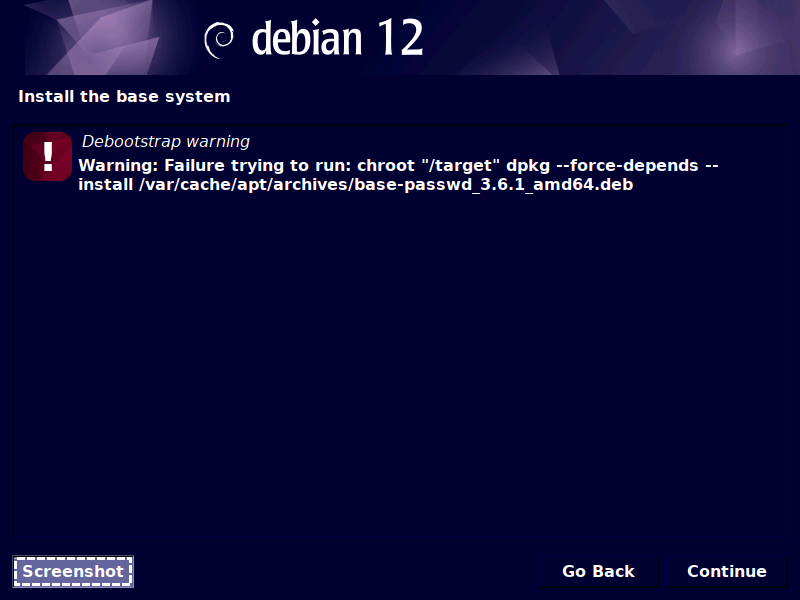
And in syslog at this time:
NOISES:
Aug 14 14:07:37 kernel: [ 291.469969] Adding 10485756k swap on /dev/mapper/bod-swap_1. Priority:-2 extents:1 across:10485756k SSFS
Aug 14 14:07:37 partman: mke2fs 1.47.0 (5-Feb-2023)
Aug 14 14:07:37 kernel: [ 292.213441] EXT4-fs (dm-0): mounted filesystem with ordered data mode. Quota mode: none.
Aug 14 14:07:37 kernel: [ 292.225594] EXT4-fs (dm-2): recovery complete
Aug 14 14:07:37 kernel: [ 292.226074] EXT4-fs (dm-2): mounted filesystem with ordered data mode. Quota mode: none.
Aug 14 14:07:37 kernel: [ 292.247420] EXT4-fs (dm-1): recovery complete
Aug 14 14:07:37 kernel: [ 292.248962] EXT4-fs (dm-1): mounted filesystem with ordered data mode. Quota mode: none.
Aug 14 14:07:38 apt-install: Queueing package e2fsprogs for later installation
Aug 14 14:07:38 apt-install: Queueing package lvm2 for later installation
Aug 14 14:07:38 main-menu[2269]: (process:6723): depmod: WARNING: could not open modules.builtin.modinfo at /lib/modules/6.1.0-10-amd64: No such file or directory
Aug 14 14:07:38 main-menu[2269]: (process:6723): mount: mounting none on /sys/firmware/efi/efivars failed: No such file or directory
Aug 14 14:07:38 main-menu[2269]: (process:6723): File descriptor 3 (pipe:[496]) leaked on pvs invocation. Parent PID 16698: /bin/sh
Aug 14 14:07:38 main-menu[2269]: (process:6723): File descriptor 4 (/dev/tty1) leaked on pvs invocation. Parent PID 16698: /bin/sh
Aug 14 14:07:38 main-menu[2269]: (process:6723): File descriptor 5 (/dev/tty1) leaked on pvs invocation. Parent PID 16698: /bin/sh
Aug 14 14:07:38 main-menu[2269]: (process:6723): File descriptor 3 (pipe:[496]) leaked on pvs invocation. Parent PID 16752: /bin/sh
Aug 14 14:07:38 main-menu[2269]: (process:6723): File descriptor 4 (/dev/tty1) leaked on pvs invocation. Parent PID 16752: /bin/sh
Aug 14 14:07:38 main-menu[2269]: (process:6723): File descriptor 5 (/dev/tty1) leaked on pvs invocation. Parent PID 16752: /bin/sh
Aug 14 14:07:38 main-menu[2269]: INFO: Falling back to the package description for brltty-udeb
Aug 14 14:07:38 depthcharge-tools-installer: Not installing to non-ChromeOS board.
Aug 14 14:07:38 main-menu[2269]: INFO: Falling back to the package description for brltty-udeb
Aug 14 14:07:38 main-menu[2269]: INFO: Menu item 'bootstrap-base' selected
MAINLY:
Aug 14 14:07:38 debootstrap: /usr/sbin/debootstrap --components=main --debian-installer --resolve-deps --no-check-gpg bookworm /target file:///cdrom/
Aug 14 14:07:43 debootstrap: dpkg: warning: parsing file '/var/lib/dpkg/status' near line 5 package 'dpkg':
Aug 14 14:07:43 debootstrap: missing 'Description' field
Aug 14 14:07:43 debootstrap: dpkg: warning: parsing file '/var/lib/dpkg/status' near line 5 package 'dpkg':
Aug 14 14:07:43 debootstrap: missing 'Architecture' field
Aug 14 14:07:43 debootstrap: dpkg: unrecoverable fatal error, aborting:
Aug 14 14:07:43 debootstrap: unknown system user 'geoclue' in statoverride file; the system user got removed
Aug 14 14:07:43 debootstrap: before the override, which is most probably a packaging bug, to recover you
Aug 14 14:07:43 debootstrap: can remove the override manually with dpkg-statoverride
Aug 14 14:08:11 init: starting pid 539, tty '/dev/tty2': '-/bin/sh'
That last line is me consoling in to copy these logs off to usb drives.
So much scary noise! Eventually fatal. Hmm.
Apparently geoclue can go missing:
Friction 2
After lolling about in Kali Linux for a time, finding helpful people in #debian, including myself who realised unplugging all the other drives in the system during installation might keep entropy at bay.
However! One must boot into the installer in BIOS boot mode, not UEFI boot mode, or something apparently goes wrong because of that later.
As far as I know UEFI is a new bootloader thingamajig for showing you your motherboard manufacturer's logo after Linux has started, as well as before.
Success!
We are now in KDE Plasma, that being the only way to run wayland:
$ echo $XDG_SESSION_TYPE wayland
an eating-all-the-cpu freeze
thanks real-time process irq/37-nvidia (or something)
(the mouse lags for a while but nothing can be done)
after 1m-15hr
(apparently set off by the GPU changing frequencies of its memory|processor at the same time?
It was basically this, but a huge messy bug, with loads of smart people unable to really get into their science (or something)
Bob Jones
To the VMs!
$ sudo losetup -P /dev/loop22 /media/s/be3654b3-8643-4a6e-9477-68327cc11ff5/sa-kinetic.disk
Notice it contains LVM physical volumes, activate it, mount, copy.$ sudo pvscan [sudo] password for s: PV /dev/sda5 VG bod lvm2 [<111.31 GiB / 3.97 GiB free] PV /dev/loop22p5 VG bodkinetic lvm2 [<111.31 GiB / 3.97 GiB free] Total: 2 [<222.62 GiB] / in use: 2 [<222.62 GiB] / in no VG: 0 [0 ]
$ sudo vgchange bodkinetic -a y 4 logical volume(s) in volume group "bodkinetic" now active
$ sudo mount /dev/mapper/bodkinetic-var spool/ $ sudo cp virt/g-clone.qcow2 /var/virt/
I blew away /var for tidiness, so the one VM that lives there returns. The others are on slower|larger drives.
Side note, cloned LVM systems need to change their UUIDs, which I have glossed over here. You may need to use a VM to separate it (the .disk image) from its real self, so it can become active without a UUID clash, to then change its UUID:

You only have to change the pv uuid, not the lvs, so these dupes are fine:
Anyway,
error persists:
Error starting network 'default': error creating bridge interface virbr0: Operation not permitted
I appear to have no virbr0 interface yet...
https://wiki.debian.org/QEMU#Networking
Look at all these commands you oughtta run! This is asking for trouble. Once you break your networking, how will you google for help?
While pitching camp for a multi-day linux network research and troubleshooting festival:
root session bridge activation trick
A simple solution I stumble upon: activate the bridge from sudo virt-manager, since root tends to avoid Operation not permitted!
Then I can go back to user-mode virt-manager or virsh start gox and it gets on with virbr0 fine!
Curiously, this can still happen, but is apparently redundant.
$ virsh net-start defaultError starting network 'default': error creating bridge interface virbr0: Operation not permitted
Network Nirvanna
Why not Usermode Networking, the fabled easiness? I can't remember - perhaps my wireless card was the matter - obviously it wouldn't have been a clear and coherent time for me.
The way to get there is:
Don't configure anything but your VMs.
You must, on a brand new Linux install, observe this ceremony:
Have this error:
$ virsh start goxerror: Failed to start domain 'gox'error: internal error: /usr/lib/qemu/qemu-bridge-helper --use-vnet --br=virbr0 --fd=32: failed to communicate with bridge helper: Transport endpoint is not connectedstderr=failed to parse default acl file `/etc/qemu/bridge.conf'
Do something root-needy to activate virbr0:
$ sudo virsh net-start default
(my experience of this was in virt-manager doing similar acts which should be doing this under the hood, please let me know if it really works)
Before QEMU/KVM User sessions can do bridge networking. Perhaps they need the same device name (virbr0) as a root session that has activated, etc.
Of course there's one other thing too: (90% certainty)
/etc/qemu/bridge.conf should contain: allow virbr0
And one more thing: (98% certainty)
$ sudo chmod u+s /usr/lib/qemu/qemu-bridge-helper
In other lives, and in desperation leading up to finding the root session bridge activation trick, these were needed.
Three situations have this one error, so there must be some missing detection of the reason for a bridge to fail setup there (leading up to being a Transport endpoint),
And here's some networking action in the VM, note that upnp doesn't work:
s@g:~$ upnpc -l
upnpc : miniupnpc library test client, version 2.2.1.
(c) 2005-2020 Thomas Bernard.
Go to http://miniupnp.free.fr/ or https://miniupnp.tuxfamily.org/
for more information.
No IGD UPnP Device found on the network !
s@g:~$ ping 1.1.1.1
PING 1.1.1.1 (1.1.1.1) 56(84) bytes of data.
64 bytes from 1.1.1.1: icmp_seq=1 ttl=59 time=17.5 ms
64 bytes from 1.1.1.1: icmp_seq=2 ttl=59 time=13.9 ms
^C
Now we can run flocks of programs all over the place:
for example, using my bunch-of-programs supervisor, Zap
HAPPY BIRTHDAY DEBIAN! 30 YEARS!
What's in /var/log/syslog now
PulseEffects

